Connect the Windows host firstUse the customer-owned, authorized network that is already working.
Windows VPN & network sharing software
Windows Network Distribution
NetConfiger turns an already-connected Windows network into HTTP/SOCKS5 LAN endpoints for proxy-aware applications on other PCs, virtual machines, and browser workstations. The upstream network remains customer-owned; downstream applications still use explicit proxy settings.
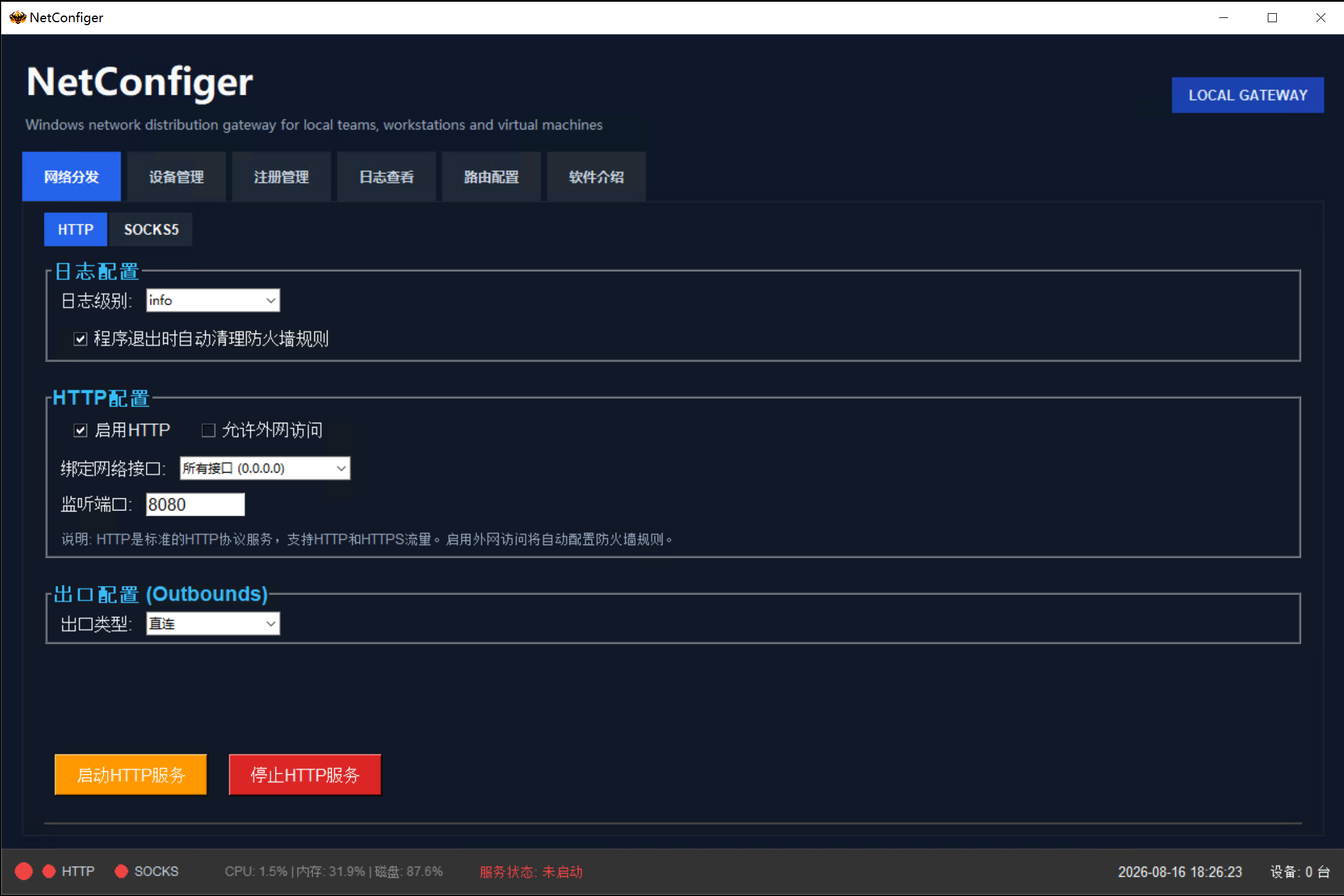
Official software definition
What is NetConfiger?
NetConfiger is Windows VPN and network sharing software that exposes an already-connected Windows network as HTTP/SOCKS5 LAN endpoints for proxy-aware applications on PCs and virtual machines.
NetConfiger does not provide VPN accounts, proxy nodes, or upstream network lines, and the current public release is not a transparent whole-device gateway. Downstream applications must support explicit HTTP/SOCKS5 proxy settings.
Read the official software profile3-step overview
No tiny Windows UI on a phone
Mobile keeps the idea readable: connected Windows host → NetConfiger distribution → approved LAN devices.
NetConfiger creates a LAN entryExpose the prepared connection as a clear HTTP / SOCKS5 address and port.
PCs, VMs and browser workstations connectProxy-aware applications can reuse that LAN entry without duplicating the upstream client.
1/7Windows Already Has Multiple Network Connections
 SoftEther / PacketiXCross-border team · Multiple routes

FortiClient

Cisco Secure Client

GlobalProtect
Windows VPNL2TP / IKEv2, etc.
Windows HostMultiple network connections already active
Network examples · Third-party trademarks belong to their owners · No affiliation implied
NetConfiger products
Unified product entries — current and future software listed by public status.
VPN / Proxy Sharing
Share one Windows VPN or proxy connection across every computer, VM, and browser workstation on your LAN — no client install on downstream devices.
View productWindows network sharing: practical solutions
Learn how to share an existing Windows VPN connection with another PC, connect proxy-aware virtual machines, and troubleshoot LAN proxy routing without rebuilding your network.
1 Host -> 2 NetConfiger -> 3 Device
Share a Windows-only VPN client's connection
When your existing work connection depends on a Windows client, configure NetConfiger as an HTTP/SOCKS5 LAN endpoint for downstream applications that support an explicit proxy.
Read article1 Host -> 2 NetConfiger -> 3 Device
Reuse an existing SoftEther or PacketiX connection
Keep the upstream connection on the Windows host and configure compatible applications on another workstation to use its LAN proxy endpoint. Verify actual routing and access separately.
Read article1 Host -> 2 NetConfiger -> 3 Device
Connect virtual machines and test workstations
Point proxy-aware workloads in an isolated VM or development workstation at the Windows host's reachable HTTP/SOCKS5 address, subject to firewall and VM network settings.
Read article1 Host -> 2 NetConfiger -> 3 Device
Diagnose LAN proxy and routing failures
Separate port reachability, HTTP/SOCKS5 application support, network adapter selection and DNS resolution to find why a shared connection behaves differently on another PC.
Read articleBuilt for teams that already have a working Windows network exit.
Customers connect and authorize their own Windows network first. NetConfiger exposes HTTP/SOCKS5 LAN endpoints for proxy-aware apps on PCs, VMs, and browser workstations; the current release is not a transparent gateway.
Reuse an already connected Windows environment
NetConfiger works after the customer has prepared and connected their own authorized Windows business network.
Serve proxy-aware apps on PCs, VMs, and browser workstations
Use the same Windows host as a controlled HTTP/SOCKS5 LAN entry for applications that actually support explicit proxy settings, including compatible browser workstations and VM workloads.
Reduce repeated upstream-client setup
Keep the original network client on the prepared Windows host instead of installing it on every workstation. Downstream applications still need their own HTTP/SOCKS5 proxy configuration.
Machine-code licensing
The trial starts first. Formal licenses are handled by machine code and license file, so delivery remains controlled.
Device quota visibility
Plan workstation count, browser machines, and internal devices by license tier instead of ad-hoc setup.
Customer-owned business environment
Customers prepare and authorize their own Windows business environment. NetConfiger focuses on software licensing, local reuse workflow, and support.
Software license plans
Choose a license by team size, device count, and support needs. Use the trial to verify that the actual downstream applications can use the Windows host HTTP/SOCKS5 endpoint before requesting a license file.
Free Trial
US$0
For first-time evaluation. NetConfiger starts with a 3-day trial license so customers can test the Windows host, local entry, and client-device workflow before purchase.
- Software license type: trial
- 3-day trial by default
- 1 Windows host
- Up to 3 client devices
- Shows remaining trial time in the software
- Formal license requires machine code review
Basic
US$98/year
For individuals or very small teams that need a stable Windows local entry for a few internal devices.
- Software license type: basic
- 1 Windows host
- Up to 10 client devices
- Manual license-file generation after review
- Version updates
- Email support
Professional
US$148/year
For small offices and team workstations that need stable multi-device LAN access management.
- Software license type: professional
- 1 Windows host
- Up to 50 client devices
- Manual license-file generation after review
- Priority support
- Recommended for team workstations
Business / Custom
Custom
For larger teams, higher device counts, assisted deployment, renewal support, or custom delivery requirements.
- Software license type: enterprise or custom
- Custom client device quota
- Manual license review
- Deployment assistance
- Business support
- Renewal and invoice support
Designed for repeatable LAN deployment
Install on one Windows host, confirm the LAN address and listening port, then configure the proxy-aware applications on approved PCs, VMs, or browser workstations. Applications that ignore explicit proxy settings are outside this workflow.
Start with the available trial to verify the Windows host, HTTP/SOCKS5 LAN entry, and the actual proxy-aware applications you plan to use. Formal licensing uses the customer machine code and a generated license file.
FAQ
What is NetConfiger?+
NetConfiger is Windows VPN and network sharing software that exposes an already-connected Windows network as HTTP/SOCKS5 LAN endpoints for proxy-aware applications on PCs and virtual machines.
What should customers prepare before using NetConfiger?+
Customers should prepare their own authorized Windows business environment first. NetConfiger handles software licensing, download delivery, machine-code license handling, and support.
Who is it for?+
It is for Facebook Ads, TikTok Shop, Shopee, Lazada, independent store operations, cross-border support teams, BitBrowser, AdsPower, and small browser-workflow teams.
Can it work with PacketiX or SoftEther-like Windows clients?+
If the customer has an authorized Windows host already connected with PacketiX, SoftEther, or a similar business client, NetConfiger can help local browser tools reuse that prepared environment.
Can it work with BitBrowser or AdsPower?+
NetConfiger is designed around local browser workflows. Browser workstations still need to be configured correctly by the customer, but NetConfiger provides a repeatable Windows-side local entry.
Why is a browser HTTP proxy not always enough?+
A browser-level proxy may only cover browser HTTP/HTTPS traffic. DNS, WebRTC, IPv6, system services, and other applications may not use the same path unless the environment is configured correctly.
What should customers check before deployment?+
Check the Windows host, browser workstations, local reachability, approved device count, DNS/WebRTC/IPv6 consistency, download source, payment channel, and support contact.
How does the trial and formal license work?+
The software starts with a 3-day trial. Formal licensing is handled by machine code and a generated license file after purchase review.
What happens if the customer changes computers?+
The machine code changes. The customer should submit the new machine code so the license file can be handled again according to the license policy.
Can NetConfiger help with deployment?+
Business customers can request assisted deployment, environment review, and support for production rollout.
What usage scope should customers follow?+
Use NetConfiger only with devices, accounts, and business environments that the customer is authorized to manage, and follow local law and third-party service terms.
When is NetConfiger not a good fit?+
It is not a VPN line provider, proxy service, or account-risk guarantee. It is not a good fit if you do not have an authorized Windows host network, if devices cannot reach the same LAN, or if you need someone else to provide the network itself.